The order matters more than any single step. If you can still sign in to Binance, lock the account first. Then take the inbox back and clear out what was planted in it. Only then change the email address on the exchange, because changing it into an inbox you have not finished securing hands the account straight back.
The reason for the rush is that an email account is the place where an exchange account gets reset. It receives the sign-in alerts and the codes sent by email, and it is where “forgot password” lands. Your second factor, the extra code or key on top of the password, is what keeps a stranger out of the exchange account while the inbox is theirs, so how much of a hurry you are in depends on what else they have.
The order, in short
- If you can sign in to Binance: disable the account, or at least check its devices and withdrawal settings now.
- Take the inbox back through your provider’s recovery page, from a device you trust.
- Inside the inbox: new password, sign out every other session, remove forwarding rules and filters, check the recovery phone and email.
- Back on Binance: change the login password, then change the account email. Expect withdrawals to pause for up to 24 hours.
Step one: protect the Binance account while you work on the inbox
Binance lets you disable your own account if you see activity you do not recognise. On the website it is under the profile icon, Account, then Security, then Account Management, where Disable Account has a Disable button; in the app it is Account Info, Security, Manage Account, Disable Account. You complete the security verifications it asks for and the account stops. Reopening it later goes through the unlock flow described in the guide to a locked or frozen account, with a hold of up to 48 hours on withdrawals afterwards.
Disabling is the right call if anything in the account already looks wrong: a device you do not know, a withdrawal address you did not add, an API key (access for an outside app or bot) you did not create. If everything still looks exactly as you left it and your second factor is an authenticator app, passkey or security key, something that never arrives by email, you can reasonably skip the disable and go straight to the inbox, keeping the exchange tab open.
If one of the verifications Binance asks for is an email code and the email is no longer yours, you cannot finish the disable that way. Go to the reset route under step three instead.
Step two: take the inbox back and clear what was left in it
Work from a device you trust, not the one you clicked a suspicious link on.
Which situation you are in decides the first move:
You can still sign in to the email. Change its password now, to one you have never used anywhere. Then sign out every other session, meaning every phone, computer or browser still logged in to the mailbox: Google calls the list Manage devices under Your devices, and lets you mark unfamiliar entries under Review security events as not you.
The password was changed and you are locked out. Use the provider’s own recovery page and answer what it asks as well as you can; Google’s is its account recovery page, reached from the sign-in screen. Do this from a device and network you have used with that account before, which recovery systems tend to treat as evidence that you are you.
Once you are back in, the work is not finished. An intruder who expects to lose the password leaves something that keeps working after it changes. Check, in this order:
- Forwarding rules and filters. A rule that forwards copies of everything, or one that quietly deletes or archives mail from the exchange, is the classic leftover. It means you would never see the next alert.
- Recovery phone number and recovery email. If either was changed, the intruder can take the account back the moment you leave.
- Connected apps and app passwords. Anything with access to the mailbox keeps it after a password change.
- Two-step verification on the email itself. Turn it on, with a method that is not a text message if you can.
Step three: how to change the email on Binance, or reset it if you cannot sign in
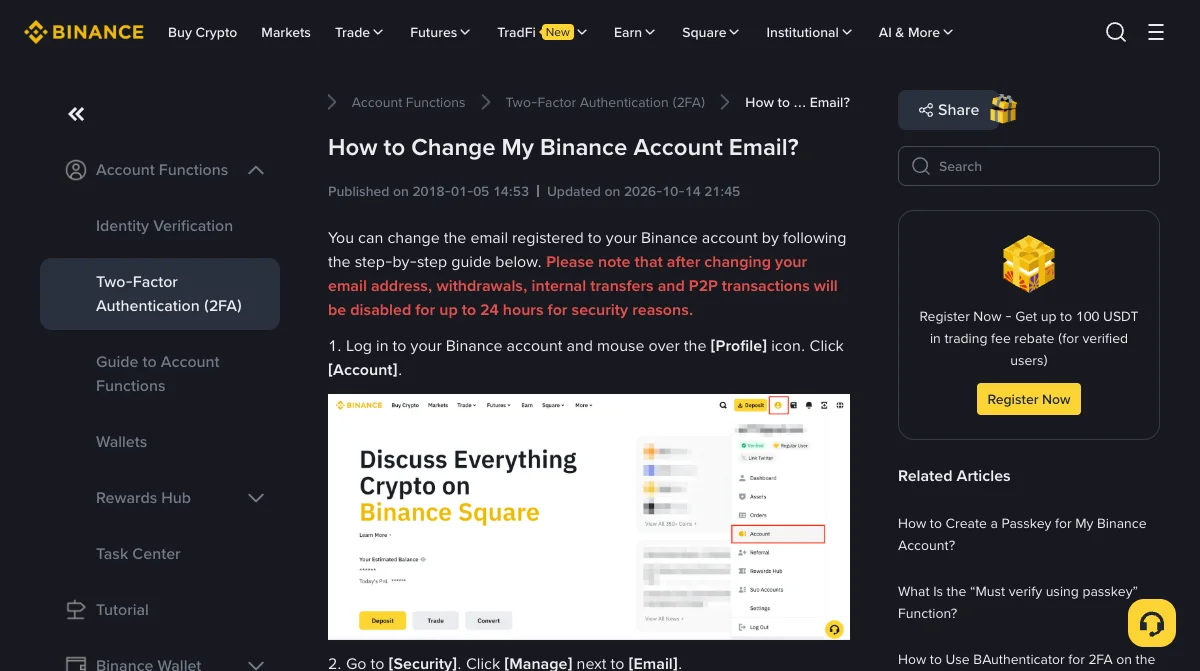
If you can sign in to Binance, the change is self-service. Binance’s page gives it as: profile icon, Account, Security, Manage next to Email, then the edit icon. You confirm with your passkey or 2FA code, enter the new address, and type in the code sent to it.
Two consequences come with it, both on the page. Withdrawals, internal transfers and P2P transactions are disabled for up to 24 hours. And the old address cannot be used to register again for 30 days.
Change it to an address that is clean, not to the one you have just recovered, unless you are confident step two is complete. A good choice is an address used for nothing but the exchange. Binance’s own security tips recommend a unique email and password and two-factor authentication on the email account.
If you cannot sign in to Binance because the email verification is one of the steps, there is a reset route for exactly this. Go to the login page, enter your email or phone number and password, and on the security verification page choose the method you have lost, here Email. Then follow Security verification unavailable? to the Reset Security Verification page. You confirm with the factors you still have and may be asked for a new email address. Binance says withdrawals, P2P selling, internal transfers and payment services are disabled for up to 48 hours after such a reset. A request that goes under review can take up to 24 hours, with the answer sent to the new address.
Step four: check what changed on the exchange side
With the account back under your control, look for what an intruder would have set up for later, not for what they took. Four places, and the login history guide shows how to read the first two:
- Devices and login history. Remove any device you do not recognise.
- The withdrawal whitelist, the saved list of addresses the account may send crypto to. An address you did not add is the most important thing to find. The whitelist limit, if you set one, holds new addresses for 24, 48 or 72 hours, and the whitelist guide explains why that is your window.
- API keys. Delete any you did not create; the API key guide explains which permissions matter.
- The anti-phishing code. Set a new one, because the old one was visible to whoever read your mail. The anti-phishing code guide covers what it does and does not prove.
What not to do while this is going on
Do not reply to emails or messages offering to help you recover the account, even if they arrive in the inbox you have just won back and look exactly like the exchange. An intruder who has read your mail knows exactly what to imitate. Check any message that looks official with the one-minute email check, and open Binance from its app, not from a link in the message.
And do not move the whole balance in a panic to an address you have not used before. That kind of withdrawal is what the holds above are there to slow down, and a rushed transfer to a mistyped or substituted address cannot be undone.
Steps and holds come from Binance's own pages, all read on 9 November 2026: How to Change My Binance Account Email (updated 14 October 2026), How to Reset 2FA When I Can't Access My Binance Account (updated 18 March 2026), How to Disable My Binance Account (updated 24 November 2025) and How to Secure My Binance Account. The inbox steps follow Google's page on securing a hacked or compromised Google Account, read the same day; other email providers name things differently but offer the same controls. Menus move: if a menu name on your screen differs, the order of the work does not.
When the email is the weak point
Can someone get into my Binance account with only my email?
Not with the email alone, as long as a second factor is switched on and is not also in that inbox. What the email gives an attacker is the reset path, the sign-in alerts and the codes sent by email, which is why the second factor and its backups matter more once the inbox is gone. If the email was the only thing standing between a stranger and the account, treat the exchange account as compromised too.
Why are my withdrawals paused after I changed my email?
Binance disables withdrawals, internal transfers and P2P transactions for up to 24 hours after an email change. It is a deliberate hold: if the change was made by an intruder, it gives the real owner time to notice. It ends by itself and does not need a support case.
Can I reuse my old email address on Binance later?
Not straight away. Binance says an old email address cannot be used to register again for 30 days after it has been replaced on an account.
Should I make a new email address just for the exchange?
It is worth it. Binance's own security tips recommend a unique email address and password, and two-factor authentication on the email account itself. An address that is never used for shopping, newsletters or social accounts appears in far fewer leaked lists and attracts far fewer phishing emails.