Before anything else, two rules that apply in all four cases. Use a different device from the one you suspect, if you have one. And do not delete anything — not the strange email, not the message, not the notification. It is evidence and you will be asked for it.
A hacked account is not one situation, it is four, and the right first action is different in each. Find yours below. The states are ordered from most recoverable to least, and in each one the order of the steps matters as much as the steps.
State A: you can still log in, and the email is still yours
The best case. If the alert reached you before anything moved, this is where you are.
- Revoke every session and every device. Not just the unfamiliar ones. If you can only sign out of all devices at once, do that and sign back in afterwards.
- Change the exchange password, to something generated rather than invented.
- Check the withdrawal address list. Remove anything you did not add. This is where the damage is set up. An intruder goes here first.
- Check the API keys. Delete anything you cannot account for. Changing the password does not touch an API key. That is the point of creating one.
- Check the verification methods — a second factor you did not enrol, or a phone number you do not recognise, means they intended to come back.
- Then re-enrol your own second factor from scratch, and enable the withdrawal allowlist with the longest waiting period available.
Step three and step four are easy to skip because the balance looks untouched, and they are the two that decide whether this recurs next week. The pattern to understand: an intruder who cannot withdraw immediately, because of a waiting period, will often leave quietly having planted the address and the key, and come back when the hold expires.
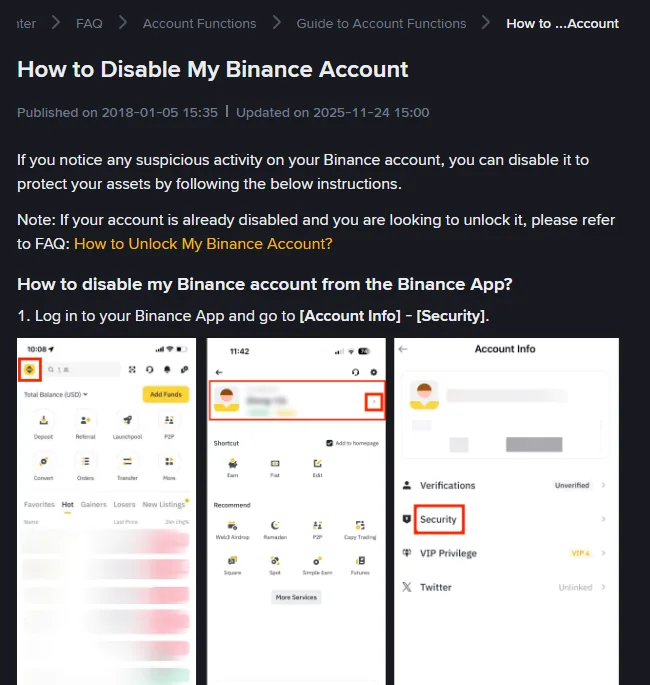
There is also a blunter lever, and it is yours to pull. Some exchanges let you disable your own account from the security settings, without contacting anyone. Binance documents it in the app under Account Info, then Security, with a separate unlock procedure for afterwards; Binance.US describes its version as pausing all activity and preventing access until you reactivate, with nothing deleted. If you can see activity happening while you are reading this and the ordered steps above feel too slow, disable first and do the list afterwards. Neither page we read lists exactly what a disable cancels, so once you are back in, still work through steps three to five.
State B: you can log in, but the email has been changed
This is more serious than it looks, because the recovery path now belongs to somebody else. Every reset link, every confirmation, every warning goes to them.
- Secure the original email account first, even though it is no longer attached to the exchange. It is almost certainly the route in, and it is attached to other things.
- Open a support case from within the account, reporting the unauthorised email change specifically. Say plainly that the address on the account is not yours. Do this before you revoke anything, while your own session is certain to survive.
- Then revoke every other session and change the password. If the platform only offers sign-out-everywhere, expect to need the case you just opened to get back in.
- Do not log out until you have done the above. A session you hold is leverage; once released you may not get it back.
State C: you cannot log in at all
Password rejected, or the second factor no longer works, or the account reports itself as not existing.
The instinct here is to keep trying combinations. Resist it — repeated failures can trigger a lockout that slows down the real recovery.
- Start the official account recovery process, from the exchange's own site reached by typing the address. Not from a search result, and not from a link in any message. If the password still works and only the second factor fails, Binance has a self-service reset behind a "Security verification unavailable?" link on the verification pop-up; its guide says a review can take up to 48 hours and that withdrawals are disabled for 48 hours after the reset. If you cannot get that far, its guide sends you to customer support.
- Report it as unauthorised access, not as a forgotten password. A password reset assumes nobody else is involved, and here somebody is.
- Lead with things only the owner could know: the opening date, the last few transactions, the payment method used, the addresses you normally withdraw to.
- Then secure the email account anyway, on the assumption it is involved.
- Wait. Submitting the same request from three devices does not accelerate it, and anyone who contacts you offering to accelerate it is running the second attack.
State D: your phone has lost service
Handled at length in the piece on SIM swaps, but the compressed order matters enough to repeat: email account first, from a different device; then the exchange; then the mobile operator, contacted by any route other than your own number.
The reason email comes before the exchange, even though the money is at the exchange, is that whoever holds the email can undo everything you do at the exchange. Securing the exchange while the email is still theirs only lasts until their next reset link.
If a withdrawal is already in progress and your account has a waiting period on new addresses, you may have hours rather than minutes. That window is the entire reason for the setting, and it only helps if you spend it revoking access rather than reading about what happened.
Is your phone or computer compromised too?
Somewhere in the middle of all this is a question nobody wants to ask: was the problem the account, or the machine you are using to fix it?
It matters because changing a password on a compromised computer hands over the new password as well. The signs worth taking seriously are the mundane ones — browser extensions you do not remember installing, software you downloaded to solve a problem that a stranger described to you, or a remote-support tool that somebody talked you into running during a phone call.
If any of that applies, do the steps above from a different device. A phone, a work laptop, a family member's computer — anything that has not been part of the story. It is slower and it is the difference between fixing the problem and repeating it.
If nothing applies and the compromise clearly came through a message or a reused password, your device is probably fine and you can carry on. The point is to spend thirty seconds deciding rather than assuming, because the assumption runs in the convenient direction by default.
What to write down while it is happening
Ten minutes of record-keeping now saves an argument later, and you will not remember any of it tomorrow.
- The time you first noticed, in a specific form you can repeat consistently.
- Screenshots of the login history, the device list and the withdrawal history, taken before you revoke anything.
- Transaction identifiers for anything that left, and the destination addresses.
- The full text of any message or email involved, headers included, kept rather than forwarded and deleted.
- Case numbers and timestamps for every support contact you make.
Take the screenshots before you start revoking, not after. Revoking sessions clears the list you would want to show someone.
What to put in the support case
A case about unauthorised access is read by someone who has never heard of you and has to decide, from what you send, whether you are the owner or an attacker pretending to be one. Write it so that the decision is easy.
- One sentence at the top saying what happened, with a time and a time zone. "Someone else signed in to my account and changed the email address at about 14:10 UTC today" is enough to start.
- What is yours and what is not. The devices, withdrawal addresses and API keys you recognise, and the ones you do not.
- What you have already done, in order, with times. It stops the reviewer asking you to do it again, and it explains the changes they will see in the logs.
- Transaction identifiers and destination addresses for anything that left, pasted as text as well as shown in screenshots.
- The screenshots you took before revoking, attached rather than described.
Three things never go in a case, whoever asks for them: your password, a verification code, or a wallet recovery phrase. A genuine reviewer does not need any of them to verify you, and a request for one, inside a case or outside it, means you are not dealing with the exchange.
When they reply, answer inside the same case. If the reply arrives by email with a link, open the case page yourself and check the message is there before you click anything, because the days after an incident are when an imitation reply is most convincing.
What to check in the three days after the hack
The first hour is about access. The next few days are about what the intruder may have left behind, and about the second wave of contact.
That evening, look at the account again from a clean device: sessions, withdrawal addresses, API keys, verification methods. Anything that has come back means access was not fully closed, usually through the email account or a device.
When the waiting period ends, check the address list once more, and check that the waiting period itself is still switched on. If your whitelist holds new addresses for 24 to 72 hours, anything planted during the incident and missed in the clean-up only becomes usable then, which is the moment the intruder was waiting for.
Wherever the password was reused, change it. That means anywhere the exchange password or the email password was also in use. Whoever had them will try them elsewhere.
On the phone and in the inbox, expect offers of help from people presenting themselves as the exchange, a recovery firm or an investigator. None of them were assigned to you. How those approaches work is a short read and better done before the first one arrives.
Can stolen crypto be recovered after an exchange account hack?
Two things are worth saying plainly, because the alternative is a worse surprise later.
An on-chain withdrawal that has confirmed is gone. No exchange can reverse it. Reporting quickly still has value — if the funds move into another regulated platform, a fast report can support a freeze there — but the base case is that the money does not come back.
Account recovery is a slow, evidence-based process, and being polite, complete and patient genuinely helps more than being loud. What consistently does not help is opening multiple cases, escalating on social platforms, or accepting help from anybody who appears in your messages offering it.
Once it is settled, the rebuild is not the same as the original setup. Assume the device is suspect until proven otherwise, assume the email account needs its own security work, and treat the eight settings as a sequence to redo rather than to check. If you would rather have the order handed to you, the hacked account plan asks what you still control and prints the plan.
This piece describes a response procedure, not any one platform's policy, and gives no success rates and no timings beyond the ones a platform publishes. The structural fact it leans on is that newly added whitelist addresses can be held for up to 72 hours on at least one major platform, through a separate setting the account holder has to switch on, as set out on its withdrawal settings page, read September 2026 and re-read 3 October 2026. The self-service disable and the 2FA reset come from the exchange's own help pages, read on the same dates. Written from documented procedure, not from a case we handled.
Moving what is left, and reversing what has gone
Should I move my remaining funds off the exchange immediately?
Only to an address you already control and can verify, and only after you have revoked the intruder's sessions. Moving funds in a hurry to a newly created wallet, on a device that may itself be the problem, risks the remainder.
Can the exchange reverse a withdrawal that has already left?
Once an on-chain withdrawal is confirmed it cannot be reversed by the exchange. Reporting it quickly still matters, because it can support a freeze if the funds reach another regulated platform, but treat recovery as unlikely rather than expected.