Two minutes will settle this for most readers. Open the API management page, count the keys, and if the number is zero you are finished; the rest of this is background. If it is not zero, the check below tells you which ones to delete.
The reason to check rather than assume is that API keys are the one credential on the account that bypasses everything else you have configured. No password prompt. No authenticator code. A key is presented, the server recognises it, and the action happens. That is the point of the mechanism, and it is also the entire risk.
Where to find your API keys, and how to read the list
On Binance the page is written down rather than hunted for. On the website: click the profile icon, choose Account, then API Management. In the app: switch on the Pro version, open More to reach the services panel, scroll to the Other section and open API Management. Other exchanges put it under account settings or a developer heading; it is never inside the trading screen.
Once you are there:
- Count the keys. For most people the correct number is zero. Anything above zero needs a name you recognise.
- Read the label on each one. If a key is called "key1" or has no label, you cannot tell what it belongs to, and you should treat it as unaccounted for.
- Check the last-used date, if the page shows one, against when you last ran that tool. A key for software you stopped using in spring, used last week, is the finding.
- Open each key's permissions and confirm withdrawal is off.
- Delete anything that fails steps two, three or four. Revoking costs nothing and a new key takes a minute to create.
The list is empty
You are finished, and this is the answer for most readers. Nothing else in this article applies until you decide to connect a tool.
Keys you recognise, withdrawal off
Fine. Set yourself a reminder to look again in three months, because the risk here is the key you stop thinking about rather than the one you are using.
A key with withdrawal permission
Turn that permission off if the tool still needs the key, or delete the key if it does not. No portfolio tracker and no tax tool needs it.
A key you did not create
Delete it, then stop treating this as a key problem. A key cannot create itself, so somebody had access to the account. Go to the first-hour sequence and work down it.
One thing worth knowing before you go looking: on Binance you cannot create an API key at all until two-factor authentication is on, identity verification is done and the account has received a deposit. So on a new or unverified account the list is empty by design, and a key appearing on one is a louder signal than it would be elsewhere.
What each permission actually grants
| Permission | Lets the holder | Worst case if the key leaks |
|---|---|---|
| Read only | See balances, positions and history | Loss of privacy, and a detailed map of what you hold for anyone targeting you |
| Spot trading | Place and cancel orders | Your balance traded into something illiquid at prices that suit somebody else |
| Margin or futures | Open leveraged positions | A position large enough to lose the collateral entirely |
| Withdrawal | Send funds off the platform | The balance leaves and does not come back |
One row of that table is not like the others.
The withdrawal box is the one to leave unticked. Very few legitimate tools need it — portfolio trackers do not, tax software does not, and most trading bots do not either. If something asks for withdrawal permission, the burden is on it to explain why, and "for convenience" is not an explanation.
The trading permissions deserve more respect.
A key that can only trade cannot move funds off the platform, which sounds reassuring until you consider what a hostile party can do with the ability to place orders in a thin market. The pattern is old and it does not require a withdrawal permission to be profitable for the attacker.
IP restriction: the API key setting that does most of the work
IP restriction is the single most effective control here, and the easiest to skip because it takes five extra minutes. A key restricted to one address only works from that address. A leaked key that is locked to a server in a data centre you control is close to useless to anyone else.
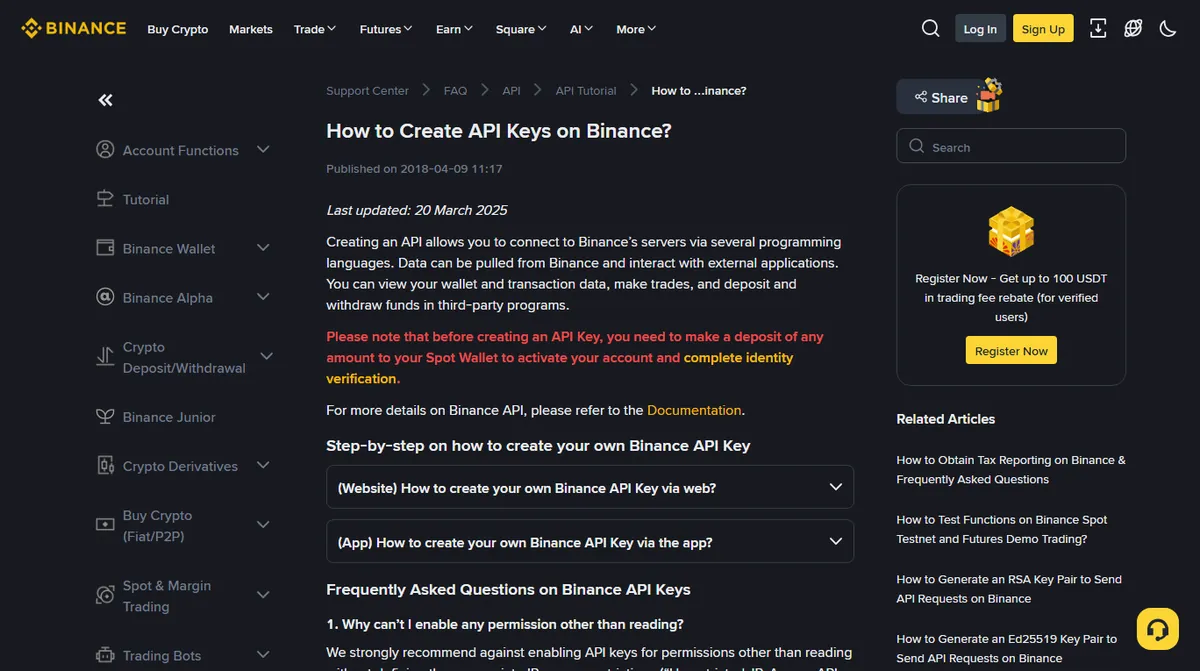
Some exchanges enforce this by making it a condition. Binance's page on creating API keys, read on 3 October 2026, says an HMAC key with unrestricted IP access gets no permission other than reading, and that adding an IP restriction is mandatory before withdrawal permission can be enabled. Treat restrictions like that as a feature rather than an obstacle.
If the tool runs on your laptop at home, on a connection with an address that changes, IP restriction is awkward. If you skip it, reduce the permissions instead (on Binance an unrestricted HMAC key can only read anyway), and set a reminder to delete the key when you stop using the tool.
That reminder is the part that never happens.
The secret half of the key is the part you have to store yourself, and the creation screen may be the only time you are shown it, so plan as if it is. That is why keys end up pasted into notes apps, chat messages to yourself and configuration files that later get committed to a public code repository. If you cannot store it somewhere that meets the same standard as your backup codes, do not create the key.
How to manage API keys safely if you use bots or trackers
- One key per tool. Shared keys make it impossible to work out which service leaked, and impossible to revoke one without breaking the others.
- Name them after the tool, not "key1". Six months later the name is the only thing standing between you and guessing.
- Review the list quarterly and delete anything you cannot immediately account for. This takes about a minute and is the highest-value minute in this article.
- Revoke rather than edit when a tool is compromised or you simply feel uneasy. Creating a new key costs nothing.
- Watch for keys you did not create. A new key appearing on the list is one of the clearer signs that someone else has been inside the account, and it is exactly the sort of thing the activity log exists to corroborate.
How API keys get leaked or stolen
Almost never through the exchange. The failure is nearly always on your side of the boundary, and the routes are predictable enough to be worth naming.
- A configuration file that ends up in a public code repository. This is the classic failure, and it does not only happen to professional developers — anybody following a tutorial to run a trading script is one careless commit away from it. Automated scanners find newly published keys within minutes.
- A screenshot. Someone asks for help in a forum and posts a picture of their setup screen with the key visible, or partially visible in a way that is still enough.
- The tool itself being breached. You gave the key to a service, the service was compromised, and every customer's key went with it. Nothing you did was wrong, which is precisely why the permissions you granted matter.
- A machine with something unpleasant on it. Credential-stealing malware looks for exactly this kind of file, and a key sitting in plain text in a home directory is easier to take than a password behind a manager.
Notice what each of those has in common: none of them are detected by you at the time. That is the argument for the two settings that limit the damage rather than prevent the leak — no withdrawal permission, and an IP restriction where the tool's setup allows it. You are not going to notice the leak, so the useful question is what the key is worth to whoever found it.
How to tell a key has been used by someone else
Keys are quiet. That is their function — software acts on the account without anybody being prompted, which is also why a stolen one can work for weeks before the balance says anything.
Four places show it, and none of them is the balance.
- The key's own last-used timestamp, where the API management page shows one. A key for a tool you stopped running in March, with a last-used date of last Tuesday, is the finding. This is the single most useful field on that page and almost nobody looks at it.
- Order history you did not place. Not necessarily losses — a key being tested often places something small and unremarkable first. Read the list rather than the total.
- A key whose IP restriction changed. If you set one and it is now absent or different, somebody with account access edited it, which means the problem is larger than the key.
- New keys. Covered above, and worth repeating because it is the clearest signal of the four: a key you did not create means somebody has been inside the account itself.
If any of those turn up, deleting the key is the first move and not the last one. A key cannot create itself; whoever made or took it had access to the account, and that access is the actual problem. The first-hour sequence assumes exactly this situation and orders the rest of it.
What a leaked key cannot do
Worth knowing, because the panic is usually broader than the exposure. An API key — even one with every box ticked — does not give anybody your password, does not let them change your email address or your second factor, and does not let them open a support case as you. What it can do is limited by the permissions on it and by the withdrawal controls on the account.
That last point is the reason the two controls are worth having together. A leaked key with withdrawal permission, on an account with a whitelist and a waiting period, still cannot send funds anywhere you have not already approved. The key becomes an expensive way to look at your balance. That combination is the whole argument for putting up with the delay.
Should you give your API key to a copy-trading or bot service?
A pattern worth naming: a platform offers to manage, mirror or optimise your trading, and asks you to paste in an API key with trading permission. Some of these are legitimate businesses. The structure, though, is that you are handing trading authority over your balance to a third party whose code you cannot inspect, whose incentives are not yours, and who can be breached independently of you.
If you decide to do it anyway, do it from a separate sub-account, where the platform offers them, holding only the amount you are prepared to lose, with withdrawal permission off and IP restriction on where possible. The two-account split described in the allowlist piece exists precisely for situations like this one.
Permission names and the exact set of options differ by exchange — read the API management page on your own account rather than taking the four rows above as a universal schema. The broad structure, including a separate withdrawal permission and optional IP restriction, is common to the major platforms as documented in their own API guides. The menu path, the three prerequisites for creating a key and the IP-restriction rules come from that exchange's own page on creating API keys, read September 2026 and re-read on 3 October 2026, when it showed an update date of 20 March 2025. No key was created to test any of this.