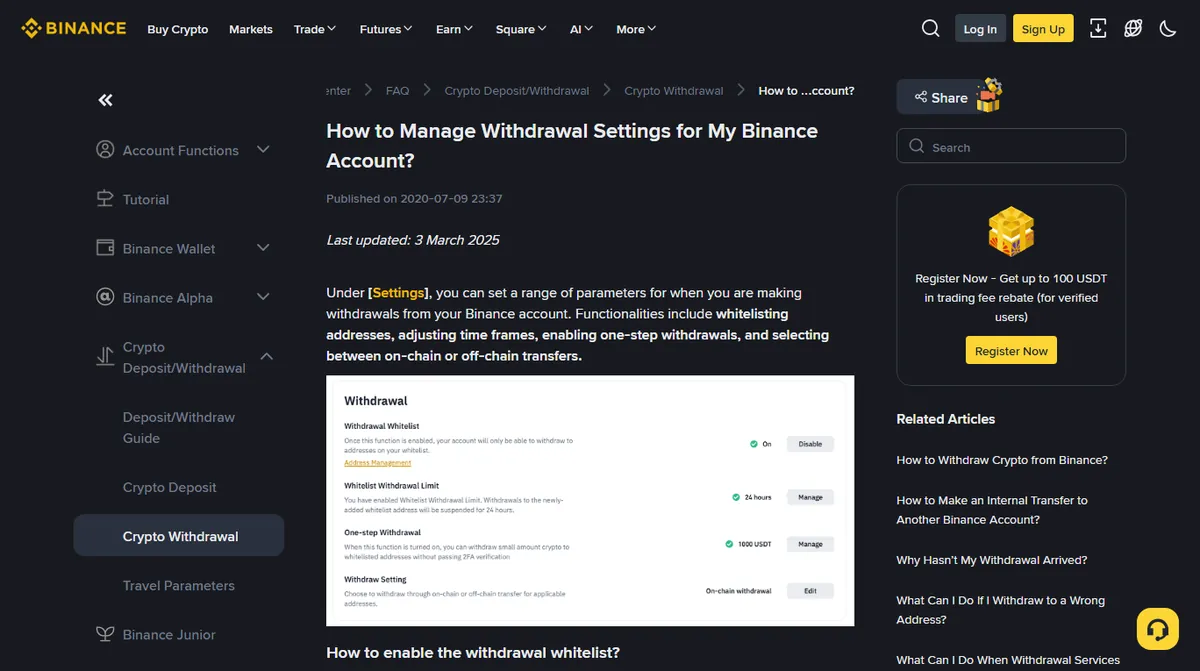
Here is the failure people do not expect. They switch on the withdrawal whitelist, feel safer, and assume that funds can now only reach the two addresses they added. Then an attacker who has taken the session simply adds a third address and withdraws to it. The whitelist did not lie; it was only ever a list, and lists can be edited by whoever is holding the account.
What converts it into a real defence is a hold on newly added addresses. On Binance that is a separate setting, not part of the whitelist itself. That hold is the window in which an alert reaches you and you can still act. Set the window and the alerts properly and this is one of the best protections available on an exchange account. Set the list without the window and you have added a step to your own withdrawals in exchange for very little.
Setting the whitelist up without locking yourself out
Order matters here more than usual, because several of these steps verify against each other.
- Get the second factor working and tested first. Adding addresses will ask for it. Half-configured verification plus a fresh whitelist is the classic way to lock yourself out of your own funds.
- Add your destination addresses before you enable the restriction, if the exchange lets you. Label them with something you will still understand in a year — "cold wallet, ledger, ETH" beats "wallet 2".
- Verify each address with a small test withdrawal while there is no delay in force. A mistyped address that is now locked into a whitelist is a specific kind of misery.
- Then enable the restriction, and separately switch on the waiting period. On Binance these are two rows in the withdrawal section of the account settings: Withdrawal Whitelist, and below it Whitelist Withdrawal Limit, where you pick 24, 48 or 72 hours. Pick the longest one you can genuinely live with rather than the shortest one that sounds responsible.
- Check that it took. The settings page should now show the whitelist as on and the limit with the number of hours you chose, as in the screenshot above. If the limit row still says off, you have a list with no delay.
- Check the alerts are on, and going somewhere other than only the account's own email address. The delay is worthless if the notice about a new address lands in an inbox you are not reading.
Expect a hold whenever you add an address, and if you switch the whitelist off while the waiting period is on. The help page also says that modifying the list may lead to a temporary suspension. That is the design working, not a fault. Plan security changes for a week when you are not moving funds.
That is the whole procedure. The rest of this piece is about the part that decides whether it was worth doing.
How the withdrawal whitelist is actually built
Reading Binance's own withdrawal settings page — the page above, read in September 2026 and again on 3 October 2026 — the shape of it is explicit, and it has three parts.
- The whitelist. Once it is enabled, withdrawals can only go to addresses on it. Adding an address is confirmed with two-factor verification, and each entry gets a label and a type: exchange, wallet or other.
- The Whitelist Withdrawal Limit. A separate switch that suspends withdrawals to newly added addresses for the period you select: 24, 48 or 72 hours. This is the waiting period, and the whitelist does not include it unless you turn it on.
- Switching things off. Disabling the whitelist while the limit is on suspends withdrawals for that period, and the page warns that modifying the whitelist may lead to a temporary suspension.
One sentence on that page deserves more attention than it gets: once the limit is disabled, withdrawals to every whitelisted address, newly added ones included, are possible immediately. The page does not say clearly whether switching the limit off carries a hold of its own. So an alert telling you the limit was turned off, when you did not do it, is as serious as an address you did not add, and the alerts are part of this setting rather than an extra.
The same page documents a one-step withdrawal option: small amounts, up to a quota you set, can go to an already-listed address without completing two-factor verification each time (the page notes verification may still be asked for). Read that sentence twice before enabling it. It is a convenience feature that removes a check. Of everything in this area, it is the one setting I would leave alone on any account holding more than pocket change.
Other exchanges implement the same idea under different names, and the naming tells you something about how they think about it. Coinbase calls it an address book with whitelisting, which frames it as convenience with a lock available; Binance calls it address management under withdrawal settings, which frames it as a restriction with an address list attached. Same mechanism, and the same thing decides whether it works: what happens in the window after a new address is added. The reasoning below transfers to both.
Does this suit your account?
This is a genuine trade, not a free win, so it deserves an honest decision rather than a recommendation.
You withdraw rarely, to the same one or two places
Turn the whitelist on, pick the longest waiting period offered, and add your destinations once. The friction lands on a day you were not planning to move anything, which is the cheapest place for friction to land.
You move funds to new destinations most weeks
The whitelist will be in your way constantly, and the predictable ending is that you disable it during an urgent moment and never re-enable it. Either accept a short waiting period, or split the account — see below.
You are the only person with access and the balance is small
Still worth switching on, because the cost is near zero. The delay applies to newly added addresses, not to every withdrawal.
Other people know you hold crypto
Turn it on and choose the longest delay. A targeted attempt depends on speed, and a 72-hour hold is not compatible with speed.
Splitting a holding account from a trading account
If the answer above came out as "both", the problem is that one account is doing two jobs. A holding account and a working account solve it cleanly.
The holding account gets the severe settings: allowlist on, longest delay, no API keys, notifications everywhere, and a second factor you would not carry casually. It receives deposits and sends to one or two known destinations. The working account holds a float, has lighter settings, and is where the weekly activity happens. If the working account is compromised, the loss is bounded by the float rather than by everything.
Where the platform offers sub-accounts, the working account can be one of those under the same verified identity; do not open a second personal account in your own name, for the reasons in the account-opening guide. It costs a little discipline about which account you are logged into. It is the single structural change that makes the rest of the settings easy to decide, because each account has one job and the right answer stops depending on mood.
How to label withdrawal whitelist addresses
An allowlist entry has a label, and labels get treated as decoration. They are not. They are the thing standing between you and sending funds to the right address on the wrong network, or to a destination you set up two years ago for a service you no longer use.
What a useful label contains: where the address lives, what it is for, and which network it is on. "Cold wallet, hardware device, ETH mainnet" tells you everything at the moment of decision. "Wallet 2" tells you nothing and will be misread by you, personally, within a year.
Some platforms also let you record whether the address belongs to an exchange or to a personal wallet. That field is worth filling in even though nothing enforces it, because the two behave differently when something goes wrong — funds sent to a personal wallet you control are recoverable by you, funds sent to an exchange account require that exchange's cooperation, and funds sent to an exchange on the wrong network may require rather a lot of it.
The related discipline is pruning. An allowlist that accumulates every address you have ever used gradually stops being a shortlist and becomes a directory, at which point it is not doing the job it was enabled for. Remove entries for services you no longer use. The help page warns that modifying the whitelist may lead to a temporary suspension, so do the clear-out in a single session rather than one entry at a time.
How to add a withdrawal address safely
The waiting period protects you from an address somebody else adds. It does nothing about a wrong address you add yourself, and once an entry is on the list, the list defends it as faithfully as it defends the right ones. Three habits cover most of the risk.
Copy the address from where the funds will land. Open the receiving wallet, or the deposit page of the receiving exchange, and take the address from there. Not from your own transaction history, an old message or a spreadsheet. A known trick, usually called address poisoning, sends you a tiny transfer from an address that starts and ends with the same characters as one you use, so that it sits in your history waiting to be copied by mistake.
Check it after pasting. Some malware watches the clipboard and swaps any address it sees for one of its own. What you copied was right; what you pasted is the thing that counts. Compare the pasted string against the source, and for a large amount compare more than the first and last few characters. Before a big withdrawal to an entry that has been on the list for months, check it against a record you keep outside the exchange, because a familiar entry in a familiar list only ever gets a glance.
Match the network, and the memo if there is one. The same asset can travel on several networks, and a list entry is only correct for the network it was saved under. Some assets sent to an exchange also need a memo or tag that tells the other side which account the funds belong to. Leave it out and the transfer arrives with no name on it, which turns a routine withdrawal into a support case. If the receiving page shows a memo, the whitelist entry needs it too.
Then make the small test withdrawal from the setup list above, and treat the entry as settled only once the test has arrived.
If an address you did not add appears
This is the alert the whole feature exists to produce, and the waiting period is the time you have to act on it. Do not spend that time wondering whether you added it yourself and forgot.
- Sign in by typing the exchange's address yourself, not through a link in the alert.
- Screenshot the address list and the login history before you change anything.
- Delete the address. Removing it may start a temporary suspension of its own. That is fine; it costs you nothing that matters today.
- Check that the waiting period is still switched on, with the number of hours you chose. If it has been turned off, the planted address was usable at once, so look at the withdrawal history next.
- Sign out of every session, change the password and check the API keys. Whoever added the address got in somehow, and may still be in.
After that you are in state A of the first-hour sequence, with the advantage of having caught it before anything moved. Look at the list again the next day. Someone who lost one planted address may try a second.
How to live with the whitelist waiting period
The delay cannot be skipped on the day you want it gone, which is exactly why it works against a thief. So stop adding destinations on the day you need them.
If a new destination is coming, such as a new hardware wallet or an account at a second exchange, add it the week before. If you keep a backup hardware wallet, add its address now while nothing is urgent, so that moving funds to it in a hurry later does not have to wait out a hold. And when the delay does catch you out, leave the switches alone. Turning the whitelist off while the waiting period is on suspends withdrawals for that same period, so it does not save the time it promises, and it leaves the account unprotected afterwards.
What a withdrawal whitelist does not protect against
A whitelist governs withdrawals of crypto to addresses. It generally has nothing to say about internal transfers between your own accounts on the same platform, trades that turn one asset into another, or payment methods that move fiat. Someone in your account can still trade the balance into something else, and that loss is real even though nothing left the platform.
It also does nothing about the case where you are the one authorising the withdrawal because somebody talked you into it. Address controls are a defence against theft, not against persuasion — that side is covered in the piece on how these conversations open.
And if you are setting this up as part of a wider pass over the account, the eight settings in order explains where this one sits and why it comes after the second factor rather than before it.
One last piece of arithmetic before you choose the waiting period. Count how many times in the past year you sent funds to a destination that was new that week. If the answer is a handful, the longest hold costs you a handful of planned days. If it is most weeks, the split described above will serve you better than any setting on this page.
The specific behaviour described here — the whitelist restriction, the separate Whitelist Withdrawal Limit with its 24, 48 and 72 hour options, the suspension on switching the whitelist off, address labelling and the one-step withdrawal function — comes from the exchange's withdrawal settings help page, read in September 2026 and re-read on 3 October 2026; that page itself carried a last-updated date of 3 March 2025. Other platforms name and time these features differently, so check yours rather than assuming the same options. None of the timings above were observed on a live account; they are what the help page states.
Before you switch it on
Does the whitelist delay every withdrawal?
No. On Binance the waiting period is a separate setting, the Whitelist Withdrawal Limit, and it holds withdrawals to newly added addresses for the period you pick: 24, 48 or 72 hours. Addresses already through that period go out as before, with the usual verification. The help page adds two cases: switching the whitelist off while the limit is on suspends withdrawals for that period, and modifying the list may lead to a temporary suspension.
Can support lift the waiting period if I need to send somewhere new today?
Do not plan around it. The hold exists so that nobody, including someone who has persuaded support that they are you, can send funds to a new address quickly. The setting is yours to change: Binance's help page says that once the limit is disabled, withdrawals to every whitelisted address, new ones included, are possible immediately, while also warning that modifying whitelist settings may lead to a temporary suspension. Read the notes on the confirmation screen before you rely on either. A message offering to lift the hold for you, especially one that arrives unprompted, is not from the exchange.
Should my account at another exchange go on the list?
Yes, if you send there regularly. Take the deposit address fresh from that exchange's own deposit page when you add it, include the memo or tag if it shows one, and check it again before a large transfer, because an exchange can change the deposit address it gives you.