The sequence. Register with an email you control and have already secured. Attach the referral code at sign-up, because we found no documented way to add one later. Complete identity verification while the account is still empty. Then set up the second factor, anti-phishing code and withdrawal whitelist. Deposit last.
Doing verification and security before the first deposit is not caution for its own sake. Several of those settings can trigger a temporary hold on withdrawals when you change them, and a hold on an empty account costs nothing.
What to have ready before you start
Three things, and getting them in place first removes most of the ways this goes sideways.
An email address you have already locked down. Unique password, its own second factor, and not an address you post publicly. The exchange account's recovery path runs through this inbox, so it is the more valuable of the two accounts. If you are about to create a fresh email for this, do the security on it first.
An identity document that photographs cleanly. Passport or national ID, unexpired, with the whole document visible. The avoidable rejections are mundane: glare across the photo page, a corner cropped off, or a phone held at an angle so the document is a trapezoid.
An authenticator app already installed. Install it now, not during sign-up, because the moment you are asked to scan a QR code is a bad moment to be browsing an app store.
Step one: the registration form
The public sign-up page asks for surprisingly little. Below is how it looked to a visitor with no account in September 2026 — one field for an email address or phone number, a privacy notice checkbox, and the option to continue with a Google, Apple or Telegram account instead.
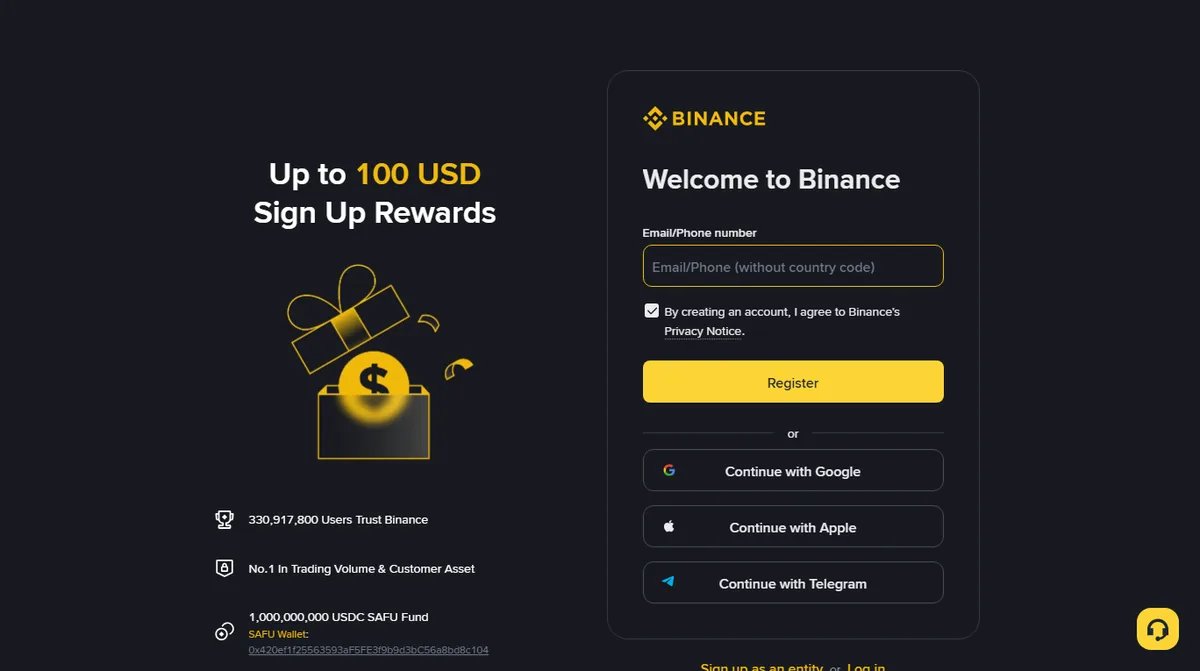
Two observations about that screen, because both trip people up.
First, there is no referral code box on it. If you want a code applied, it either comes attached to the link you arrived through, or you enter it in a separate step later in the flow where it is often collapsed behind a small line of text. Look for it before you finish. We found no setting in Binance's help documentation for adding one after the account exists, so treat the sign-up flow as the only chance.
Second, "continue with Google" is tempting and I would not use it here. It ties the exchange account's sign-in to a third account, which means the security of your exchange login is now also the security of your Google account, and it makes the recovery story more complicated rather than less. An email address with its own password and its own second factor keeps the layers separate.
If you want the referral applied without hunting for the field: the Binance sign-up page with our code attached (referral link, carries a fee discount). The code on its own is BN367 if you would rather type it in yourself.
That is a referral link. If you register through it we may receive a share of the trading fees you pay; registering through it adds nothing to what the exchange charges you, and it can take up to 20% off your trading fees. The figure that actually applies is whatever Binance shows on its own page at the time. It is the only link of its kind on this site, and nothing about this guide changes depending on whether you use it.
Step two: identity verification
Verification is not optional for any account that intends to deposit or withdraw money in a real currency. It normally runs in two parts: document capture, then a live selfie or short video used to check that the person holding the document is the person in it.
What actually determines whether this goes smoothly:
- Name matching. The name on the account should match the document exactly, including middle names, accents and hyphenation. A mismatch can hold an application in review.
- Lighting, not resolution. Even light with no flash beats a high-resolution photo with a bright spot across the hologram.
- Address documents, if asked. Where a proof of address is requested, it usually needs to be recent and to show your name and address in the same document. A bank statement with the address on a different page tends to come back.
- Region. The products available, and in some places whether the service is offered at all, depend on where you are resident. This is the step where you find out.
Automated checks can come back within minutes. Manual review is slower and the timing is genuinely unpredictable. If it is still pending after a day, leave it. Sending the same documents again from a second device does not move you up.
Treat any message during this wait as unverified. A pending verification is a well-known moment of anxiety, and it attracts messages offering to speed the review up. Nothing about a review needs your password or a verification code, nobody can sell you a faster one, and Binance's own verification page says it will never request funds or tokens through private communications. Anything genuine about the review will be visible inside the account. The four openings these messages use are worth recognising now rather than later.
Step three: Binance security settings to turn on before your first deposit
Most walkthroughs put this part of the sequence last. It belongs here, while the balance is zero, for a practical reason: changing withdrawal settings can put a temporary hold on withdrawals, and a hold on an empty account is invisible.
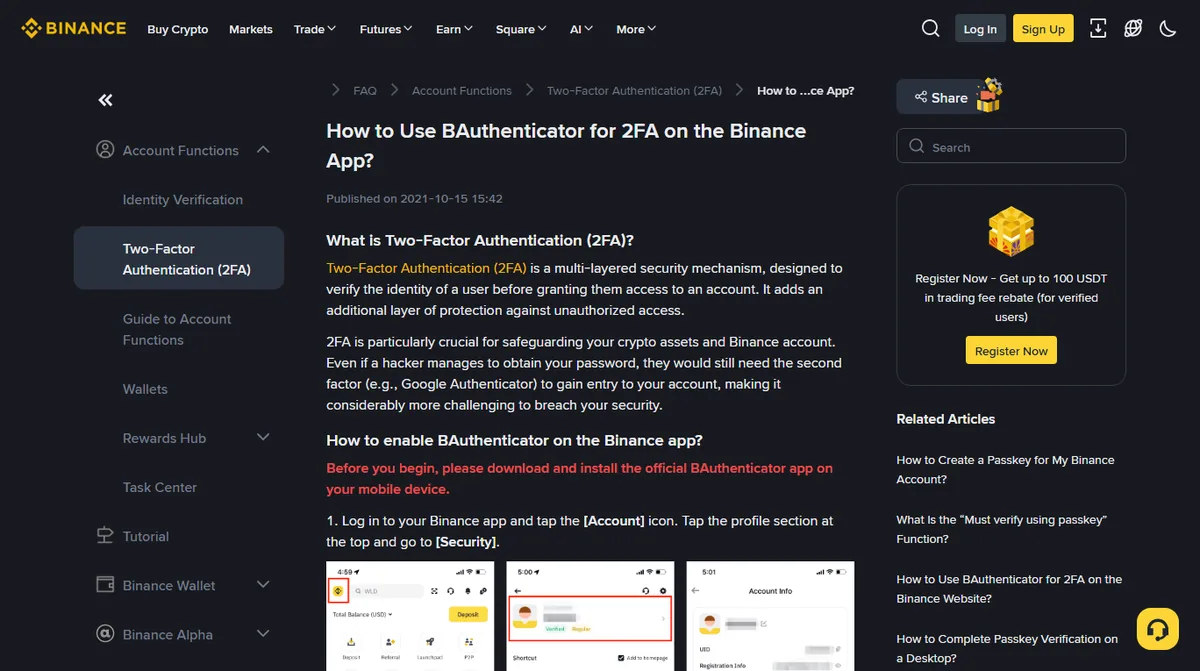
All six live on one screen. On the website: profile icon, then Account, then Security, with the last two under Advanced Security and Withdrawal further down the same settings area. In the app: the Account icon, tap the profile section at the top, then Security. Work down the list without leaving the page.
- Second factor — enrol an authenticator app or a passkey, and confirm it works by signing out and back in.
- Backup codes or setup key — save whatever recovery material enrolment shows you, somewhere that is not the phone you just enrolled.
- Anti-phishing code — six to eight characters, at least three character types, no other symbols.
- Alerts — everything on, and pushed to the app as well as email.
- API keys — confirm the list is empty.
- Withdrawal whitelist — on, plus the separate Whitelist Withdrawal Limit, which is the waiting period for newly added addresses.
The detail behind each, and why this order:
Second factor. Enrol an authenticator app, a passkey, or both. Binance documents its own authenticator app and passkey options in its help centre; the page below is the one to follow for the app, and the related articles beside it cover passkeys. Do not rely on text messages as the only method.
Backup codes or setup key. Save whatever recovery material the enrolment gives you — a set of codes, or a setup key shown with the QR code — somewhere that is not the phone holding the authenticator. This is the single step that decides whether a lost phone is an inconvenience or a month-long recovery case.
Anti-phishing code. Six to eight characters, using at least three of uppercase, lowercase, digits and underscores, with no other special characters — those constraints are set out on the exchange's own page for the feature. Once set, Binance says it is included in all its genuine emails and texts.
Withdrawal whitelist. Turn it on. Add the addresses you actually withdraw to, label them clearly, then switch on the Whitelist Withdrawal Limit, the row below it, and choose 24, 48 or 72 hours. That second switch is what holds newly added addresses; the list alone has no delay, and it is the delay that protects you.
Alerts. Everything on, and where possible pushed to the mobile app as well as email, so that a compromised inbox cannot silently swallow the warnings.
API keys. Confirm there are none. You do not need any, and an empty list is one fewer thing to check later.
All six are covered in more depth in the settings guide, which explains why this particular order and what each one is actually resisting.
What Binance identity verification unlocks
Working through the steps? This section and the next are background. Step four is here, and these two will still be waiting afterwards.
Verification is usually tiered rather than binary, and the tiers are not arbitrary. Each one exists because a particular capability carries a particular obligation for the platform.
What an unverified account can actually do differs by country and by which legal entity serves you, and it has been tightening. On several large platforms, Binance included, verification is now a prerequisite for depositing, trading and withdrawing rather than a step you can leave until later. Do not plan around a capability description you read anywhere, this page included. Your account's own Identification page states your current level and the limits attached to it, and that is the only version of the answer that is current for you.
What is stable across platforms is the shape of the tiers. The first one establishes who you are, and it is the one that opens ordinary use. A further tier, where it exists, tends to be about volume rather than capability: larger daily limits, in exchange for a proof of address or a source-of-funds declaration.
Two practical consequences worth planning around.
First, do not discover the tier boundary by hitting it. If you know roughly what you intend to move in the first month, check the limits at your current level before you start. Finding out mid-transfer that the second half of the amount will not go through is a worse way to learn them. The limits are published inside the account.
Second, the higher tiers ask for documents that take time to obtain. A recent utility bill or bank statement showing your name and address in the same document is not something most people have to hand as a file. If you think you will need the higher limit, start gathering that while the basic verification is being reviewed.
Can you open a second Binance account? What to do instead
This is the one structural decision that is far easier to make now than later, and it is easy to skip at sign-up because it feels like over-engineering for someone who has not deposited anything yet.
An account that both holds a long-term balance and handles weekly activity is being asked to satisfy two incompatible sets of settings. The holding role wants severe withdrawal restrictions, long delays and no API access. The working role wants to move funds to a new destination this afternoon. Configure for one and the other is painful; compromise and you get neither.
The answer is separation, and the route you take to it matters more than most write-ups admit.
Do not open a second personal account in your own name. Platforms generally permit one verified personal account per person, and a duplicate is not a problem that surfaces on the day you create it. It surfaces later, during a withdrawal review or a compliance check, at which point both accounts are the subject of the conversation rather than just the one you were using. Plenty of write-ups still suggest this. It is bad advice.
The supported route is the platform's sub-account feature, which exists precisely to let one verified identity run separate balances under separate credentials. It carries eligibility rules, so check whether you qualify before you design around it.
If you do not qualify, the honest answer is that you cannot get real separation inside one exchange account, and the substitute is not a second login. It is keeping only the working float on the platform and holding the long-term balance somewhere the exchange does not control. The full case for the split, and how to size that float, is in the whitelist guide. It is raised here because sign-up is the cheapest moment to work out which of those three situations you are in.
Step four: the first deposit, deliberately small
Make the first one small enough that losing it entirely would be annoying rather than serious. Not because the exchange is likely to lose it, but because the first pass through any payment path is where you find out that your bank declines crypto purchases on credit cards, or that the transfer reference field matters, or that the network you selected is not the one the other side expected.
Then do the boring thing.
Once the small deposit has arrived and you have watched the balance update, do one more thing before going any further: send a small amount back out to a destination you control, through the allowlist you just configured. That round trip tells you the withdrawal path works, that your address is correctly listed, and how long the waiting period actually feels. It is far better to learn all three on a test amount.
Binance sign-up problems: where people get stuck
Verification keeps coming back rejected
Re-read the rejection reason rather than resubmitting the same images. Most rejections name the problem. If the reason is generic, change one variable at a time: different lighting, different surface, no case around the document, and the full document inside the frame with a margin.
The email confirmation code never arrives
Check the spam and promotions folders, then check that the address on the sign-up screen is spelled the way you meant. Ask for a new code once and give it a few minutes before asking again. If you end up with several, use only the newest; the older ones may already be void. Signing up with a phone number works the same way for text messages.
A message says the new account needs activating
Anything the exchange needs from a new account is shown inside the account. A text, email or call asking you to "activate", "unlock" or "confirm" it through a link, or by reading back a code, is not how that request arrives, and a fresh sign-up is a predictable moment for someone to try it. Do not reply. Open the account by typing the address yourself and look there.
The referral code was not applied
If the account is already created without it, treat that as settled. We found no documented way to attach one afterwards, and any message offering to do it for you is not from the exchange.
The authenticator was set up and then the phone was replaced
If the old phone still works, migrate before wiping it. If it does not, you are in the recovery process. Both paths are covered here, and the migration one is far quicker.
The account is restricted straight after opening
New-account restrictions are usually a routine review rather than an accusation. What you send back determines how long it lasts — what an appeal actually needs is a short read.
What to do in your first week on a new exchange account
Three things are worth establishing while the account is new and you are still paying attention to it. Each takes under a minute and each one removes a whole class of future problem.
Bookmark the login page and never reach it any other way. Not a search result, not a link in an email, not an app store listing you found by typing the name. Paid advertisements above search results for exchange names have led to imitation sites often enough that the search box is genuinely the weaker route. A bookmark made on day one, from an address you typed, is a defence you never have to think about again.
Look at the account activity page once, deliberately, while nothing is wrong. You are building a sense of what a normal week looks like — how many sessions you have, where they appear to be, what a routine login record looks like. Reading that page for the first time during an incident is how people revoke their own tablet and miss the entry that matters.
Decide where the small-print notifications go. Turn everything on, and if the platform allows push notifications in its app as well as email, add them. An alert that arrives only in the inbox the account can be recovered through is an alert an intruder can delete before you read it.
One more, which is less a habit than a single act of planning: write down, somewhere you will find it, what your recovery position actually is. Which email the account uses, which second factor is enrolled, where the backup codes live, and whether anyone else would be able to follow that trail if you could not. People discover the gaps in this the week they need it, which is the worst possible week.
Risks that account security settings do not cover
Everything above is about keeping an account in your own hands. It says nothing about whether what you buy with it will hold its value. Crypto assets can and do fall a very long way, leveraged products can take the whole position, and no configuration of settings protects against a price. Treat the amount you put in as money you can afford to lose entirely, and be more sceptical of anything promising a yield than you are of a phishing email.
Custody is also worth a thought once the balance stops being small. An exchange account is convenient, and convenience is the thing it is genuinely good at. It is not a vault, and a balance you intend to hold for years sitting in one is a decision rather than a default.
Questions people ask before signing up
Where do I enter the referral code?
It was not on the first screen when we looked in September 2026. Either it is already attached because you arrived through a referral link, or there is a separate field, often collapsed behind a line such as entering a referral ID, later in the sign-up flow. Check before you submit: we found no setting in Binance's help documentation for adding a code to an account that already exists.
How long does identity verification take?
Automated checks often come back within minutes. Manual review takes longer and is unpredictable. The usual causes of delay are a glare on the document, a name that does not match the account details character for character, and photographs taken at an angle.
Should I deposit before or after setting up security?
After. Withdrawal whitelist changes and resets of the verification methods can pause withdrawals for a fixed period — Binance says 48 hours after a 2FA reset — and on an empty account nobody notices.
Is Binance available where I live?
Availability and the exact product set differ by country, and some regions are served by a separate entity or not at all. The registration flow will tell you during verification. Check before you plan around it rather than after.
Screenshots taken from public pages in September 2026: the registration form at the sign-up address, and the support-centre page on using the authenticator app for two-factor verification. The anti-phishing code rules come from the exchange's own page on that feature, which showed an update date of 28 August 2026 when we read it. The whitelist and its separate waiting period are described on the withdrawal settings page, the 48-hour hold after a 2FA reset on the exchange's 2FA reset guide, and the line about private communications on Binance Verify; all three re-read on 3 October 2026. Verification outcomes are decided case by case, and the sequence above is assembled from published documentation rather than from watching one go through.