Do not share the code, and do not reply, click or call anything in the message. A genuine Binance code you did not request means someone entered your email address or phone number on Binance and started something that needed it: a login, a password reset, or worse. The code is what stops them at that step. Keep it to yourself, check whether the message is genuine, then change your password and look at the account.
Most of the time the attempt fails right there. What matters is what kind of code it was, because that tells you how far the person got.
In the next ten minutes
- Do not give the code to anyone, including someone who calls “from Binance” right after.
- Check the message: does it show your anti-phishing code? Is the sender really Binance? (How to check is just below.)
- Open Binance yourself, from the app or a bookmark, and change your login password.
- Look at Account Activity and Device Management under Security, and remove anything you do not recognise.
- If the code was for a withdrawal or a change of email, phone or 2FA, disable the account first and ask questions after.
First: is the message really from Binance?
Two quick tests:
- Your anti-phishing code. This is a string of letters and numbers you set yourself under Security, so only you and Binance know it. Binance says that once you set one, it appears in every genuine email and SMS from Binance, and that if it is missing or wrong the message may be phishing and should be reported. If you have set one and it is not there, treat the message as fake: do not use any link or number in it. The anti-phishing code guide explains the setting.
- Binance Verify. Binance’s official verification page checks whether an email address, phone number, Telegram account or social media account is Binance’s. Type the sender’s email address or the number that called you into it.
A fake “code” message is phishing, a message built to get you to tap a link or call a number, and the danger is the link or number in it. A genuine one is a warning that someone is using your details, which is what the rest of this page is about.
What the code tells you about the attempt
Genuine Binance messages usually say what the code is for. The example on Binance’s own anti-phishing page reads “Your Binance login verification code”. Read your message for that word, then match it:
A login code. Someone typed your email or phone and, in most flows, your password. Assume the password is known. Change it now, and change it anywhere else you used the same one.
A password reset or account recovery code. Someone typed your email or phone into “forgot password”. They may not have your password, but they are trying the route around it. Keep the code, and make sure your email account is secured too.
A withdrawal, new address, API key or change of email, phone or 2FA. These usually need someone already signed in. Treat the account as compromised: disable it and follow the first hour after a hack.
If the message does not say, treat it as a login code.
Change the password and check the account
Open Binance yourself, never from the message. Binance’s own advice for a suspected compromise is to change the password under Security, then Login Password, delete devices you do not use under Devices and Activities, Device Management, and look at Account Activity for your last login and the activity records.
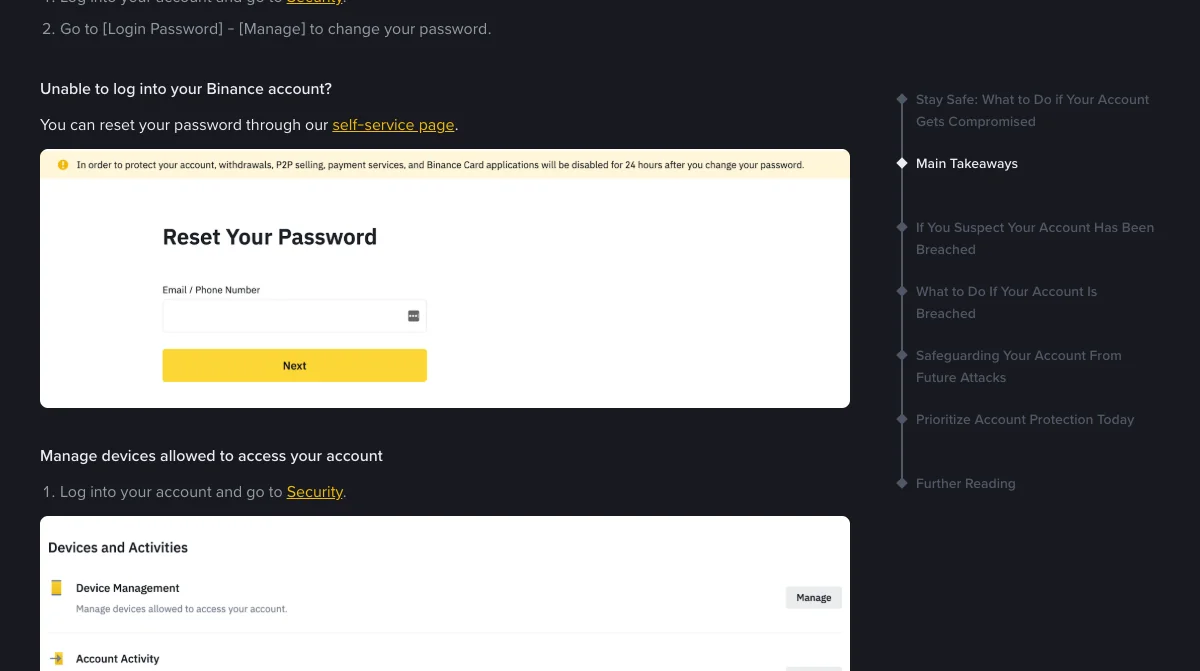
What you are looking for is covered in the login history guide: a login from a place or device you do not recognise, at a time you were not there. Then make sure your second factor is an authenticator app or a passkey rather than only SMS or email codes, because those are the codes an attacker can try to talk out of you.
When the phone rings right after
This is the most common way an unrequested code turns into a loss. The code arrives, and minutes later someone calls or messages saying they are Binance security, there has been suspicious activity, and they need the code to “cancel” it. They triggered the code themselves.
Do not read it out. If you already have, the guide to giving a scammer your code covers what the code can unlock and what to do in what order. If your problem is the opposite, codes you did request that never arrive, see Binance verification code not received.
Binance pages read on 15 November 2026: What Is an Anti-Phishing Code and How to Set It Up on Binance (updated 28 August 2026), Binance Verify, How to Resolve 2FA Code Error for My Binance Account? and the Binance blog post What to Do if Your Account Gets Compromised. What a given attempt reveals follows from how sign-in and reset flows generally work; it is not a statement from Binance.
A code you never asked for, then a call
Why did I get a Binance verification code I didn't request?
Because someone entered your email address or phone number on Binance and started something that sends a code, such as a login, a password reset or, if they are already inside, a withdrawal or a security change. Occasionally it is a typo by someone else. Either way the code is the thing standing between them and the next step, so it must not be shared.
Does an unrequested code mean my account is hacked?
Not by itself. A login or reset code usually means someone is trying, and the code is doing its job. A code for a withdrawal, a new withdrawal address or a change of email or phone is more serious, because those normally need someone to be signed in already. If it is one of those, change your password and check the account now.
Someone called right after the code arrived and asked me to read it. Who is it?
A scammer. The code arriving and the call arriving together is the whole trick: they triggered the code and need you to hand it over. Binance's own code messages say not to share the code with anyone. Hang up and do not call back on any number they give you.
Should I ignore it if I can still log in normally?
Ignoring it is the one thing to avoid. It costs ten minutes to change the password, check the device list and make sure your second factor is an authenticator app or passkey. Doing that turns a failed attempt into a dead end.