Yes, with a cost. Binance lets you close your own account, and its help page acknowledges that you may create another afterwards, but closure is irreversible and the new account’s identity verification (the step where you prove who you are with an ID document) may be blocked for 30 days or longer. Binance gives no exact date and does not say what makes the block longer.
After a hack, closing is usually the wrong tool. Securing the account you have is faster, keeps your transaction history, and leaves no month-long gap. Which situation you are in decides what to do.
Three situations, three answers
- The account was hacked, and you want a clean start: disable it, secure it and keep it. Close only if you are sure you never want it back.
- Binance closed or restricted it: use the appeal route and Binance’s written answer. A second account opened to get around the closure is not a way out.
- You only want a new email or phone number on it: change them. No closure needed.
What happens when you close a Binance account
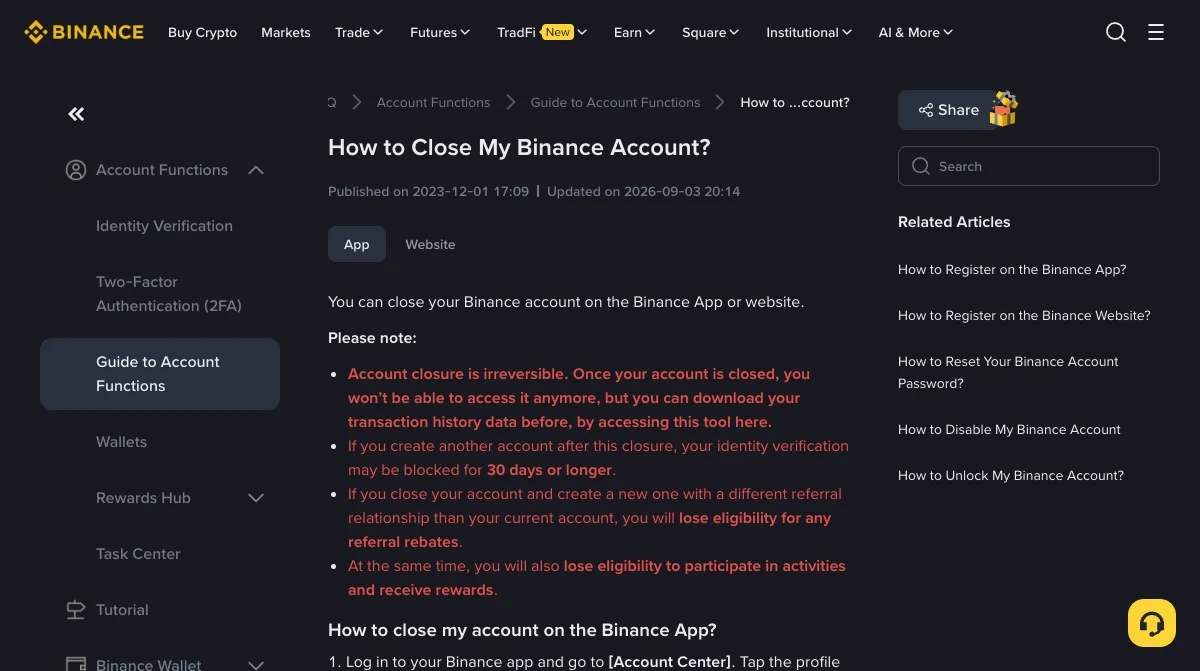
Binance’s page How to Close My Binance Account?, updated in September 2026, lists the consequences before the steps:
- Account closure is irreversible. Once closed, you cannot access the account any more. You can download your transaction history first.
- If you create another account after the closure, your identity verification may be blocked for 30 days or longer.
- If the new account has a different referral relationship from the old one, you lose eligibility for any referral rebates. You also lose eligibility for activities and rewards.
- Any assets left in the account are lost and cannot be recovered.
In the app, the route is Account Center, then Security, then Manage Account, then Close Account. You choose a reason, accept the terms, confirm that nothing is left in the account, and complete security verification. Closure is refused while any of these remain: more than 5 USD, open loan orders, a P2P order in the last 48 hours, Earn subscriptions, a margin liability, assets in the futures account, active sub-accounts, or an active Web3 wallet. If you never used these Binance features, the rest of that list does not apply to you: only the balance does, so bring it down to 5 USD or less. If you did, nothing can still be running: no open loan, no person-to-person (P2P) trade in the last two days, nothing subscribed in Binance Earn (its savings and staking products), no borrowed margin money, nothing left in futures, no extra sub-accounts and no active Web3 wallet (the self-custody wallet inside the Binance app).
Closing also does not erase you. Binance says it must keep some personal data for a period after closure, under laws such as anti-money-laundering rules.
After a hack: secure it, do not close it
Closing feels like the clean answer when an account has been broken into. It is rarely the right one, for three reasons:
- The door the intruder used is not the account. It was a password, a code, an email inbox, a device or an API key (a key that lets an outside app or trading bot use the account). A new account with the same email, the same phone and the same habits has the same door.
- Closing needs the account emptied and verified, which you cannot do quickly if the intruder still has a way in. Disabling stops everything immediately.
- You lose the record. Transaction history is what a support case or a police report is built on.
So the order is: disable the account to stop it, then rebuild what was taken, using the first hour after a hack. If the email was the way in, the hacked email guide covers changing the address on the account. Unlocking takes the security checks you would face anyway, with a hold on withdrawals afterwards.
If you have done all that and still want to start fresh, the trade is the one on Binance’s page: a permanent closure and a verification block of 30 days or more on the new account. When you do, open the new Binance account in this order, with the security settings done before the first deposit, so the new account does not inherit the old one’s weak points.
If Binance closed or restricted it
This is a different situation. A restriction or closure by Binance comes with a reason, sometimes stated and sometimes not, and a review or appeal route. Use that route, keep Binance’s answers in writing, and follow them. The guide to a locked or frozen account covers what reviews look at and how to answer one in a single pass.
Do not open a new account with different details to get around a closure. Beyond breaking the terms you agreed to, it tends to surface later, in a withdrawal review or a verification check, with the funds in the new account caught up in it.
Only want a new email or phone number? No new account needed
The email is changed under Security, next to Email, and Binance pauses withdrawals for up to 24 hours afterwards; the old address cannot be used to register again for 30 days. A phone number has its own reset flow. Both are covered step by step in the hacked email guide and the lost phone guide.
One more point, which the account-opening guide makes too: do not keep two personal accounts in your own name side by side. Closing one and opening another is a sequence; running both at once is the problem.
Binance pages read on 15 November 2026: How to Close My Binance Account? (updated 3 September 2026), and, read on 9 November 2026, How to Disable My Binance Account and How to Change My Binance Account Email. Binance's page gives the 30-day figure as a minimum ("30 days or longer") and does not say what decides a longer block, so neither do we. Waiting periods and conditions quoted on forums and blogs are left out because we could not trace them to Binance.
Closing versus disabling, and the data Binance keeps
Can I delete my Binance account and create a new one with the same ID?
Binance's page on closing an account says that if you create another account after the closure, your identity verification may be blocked for 30 days or longer. It does not promise a date or say what makes the block longer. So plan on at least a month without a verified account, and read the current page before you close.
Is closing the same as disabling my Binance account?
No. Disabling is the emergency stop: it locks the account so nothing can be done in it, and it can be unlocked later. Closing is permanent: Binance says you will not be able to access the account any more. After a hack you want to disable, not close.
Why can't I close my Binance account?
Binance lists the blockers: more than 5 USD in the account, open loan orders, a P2P order in the last 48 hours, Earn subscriptions, a margin liability, assets in the futures account, active sub-accounts, or an active Web3 wallet that has not been converted to a private-key wallet. If you never used those features, only the balance limit concerns you. Clear the one that applies and try again.
Does closing my Binance account delete my personal data?
Not straight away. Binance says it is legally obliged to keep some personal data for a period after closure, for example under anti-money-laundering law or for possible disputes, and removes it once the retention period ends.